
#1 Create a blog
It is time to setup your very own personal blog
Your blog is where you will be recording your thoughts, discoveries and exercises for the Learning 2.0 program
To set up your blog, use Blogger*, a popular free online blog hosting service that is extremely easy to use.
Creating a blog using Blogger takes just three steps:
Creating a blog using Blogger takes just three steps:
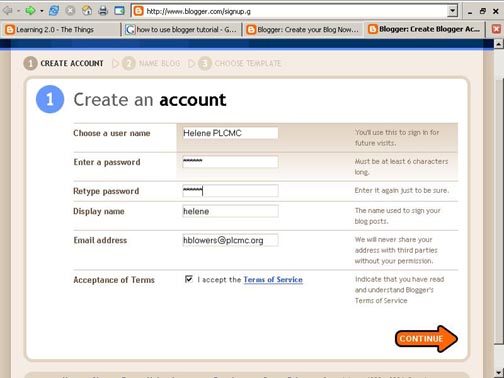
- Create an account (view screenshot)
- You can use any email address to set up a Blog in Blogger.
As Blogger is a part of Google, the software will invite you to set up a Gmail account to create a Blog. This is not necessary.
(you can use your SLV email)
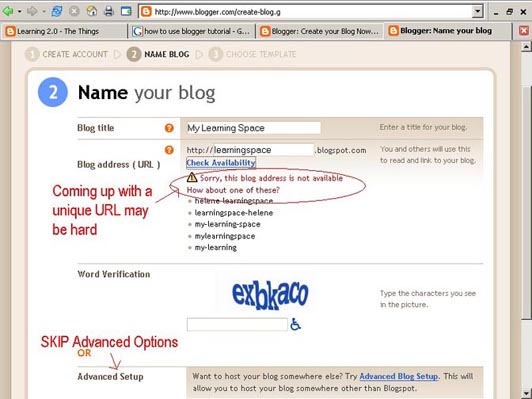
 2. Name your blog and create an address(view screenshot)
- Your Blog name or title maybe anything you wish
- Your Blog address is the unique URL for your blog. People often use their blog title, which then joins to the standard blogger address .blogspot.com
Write down your Blog name and Blog address
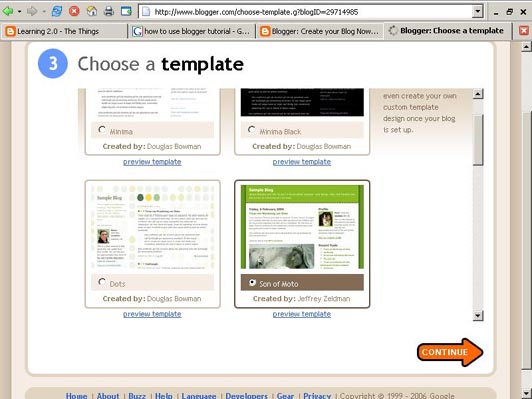
3. Select your template. (view screenshot)
- There are many different templates to choose from. You can then modify your colours/fonts etc
4. Create your first post. You may wish to say how you feel about embarking on the program; how you found the blog creation process; or just hello. (Please include # Wk 1 in the title).
Notes:
To view your blog:
- Your blog address is http://(xxxx).blogspot.com, (xxxx)=the unique identifier you entered in Step 2.
- The maintenance page that you will use to add posts, edit or change the step-up your blog is called the dashboard
- Select 'New Post'
- The title is the heading to each entry or post.
- Labels are optional tags or like subject headings to each post.
- Select 'Publish Post' to publish the entry to your blog.
- View your Blog.
*Login to your blog again using your Blog email (username) and Blog password to check all is working.
Register your blog by writing your name, blog name and URL of your blog on the sheet provided in the training session OR send your name, blog name and URL of your blog to the following email address leasey@slv.vic.gov.au
Once you have registered your Blog it will be listed on the AID Participants Blog
AID Participant's Blog
__________
Optional Exercise:
Many libraries are now using Blogs as a way of connecting and publishing information to the wider community. Explore a selection of Australian and British Library blogs, as listed below.
How do you fell about blogs as a method for communication?
Do you have any ideas for future SLV blogs?
- Read Alert - (SLV blog about Youth Lit)
- State Library of Queensland Blogs
- Yarra Plenty Library Local History Blog
- Eastern Regional Library Blogs
- British Library Blogs
- London Public Library Blogs

No comments:
Post a Comment