 # 9 Flickr
Photo sharing websites have been around since the 90s, but Yahoo owned Flickr catapulted the idea of “sharing” into a full blown online community.
Note there are other other photo sharing sites such as Photobucket, Snapfish, and Webshots among others.
Keyword tags were first used by Flickr to create associations and connections between photos and users of the site.
We will look at Flickr and discover what this site has to offer. See what groups are, and examples of how people and other libraries are using Flickr.
'State Library of Victoria' by ipsmith36hdr
Discovery Resources:
Browse the following resources about Flickr.
- The National Library's vision of building a comprehensive pictorial record of Australian history. Here is the media release from the NLA about this collaborative project
- Look at the National Library Picture Australia website. Click on the flickr icon on the front page and you will be lead to a display of images the National Library have used from Flickr.
- Many libraries and cultural institutions (incl the Powerhouse Museum) share significant photographic collections through a Flickr initiative known as the Commons on Flickr. You can learn more about the Powerhouse Museum and their Flickr contribution here.
Discovery Exercise:
- Spend 5 mins looking around Flickr and discover an interesting image. Note down the name of the photographer so you can credit them in your post.
- Add an image to your blog
- Save the photo you want to upload to your computer (either by a right mouse click for the image or click on the file and save as from the menu bar)
- Log into your blog and go to a new post
- Add the photographer's name and any caption you wish
- Click on the Add image icon along the top of the post editing page.
- This will open a window where you can browse your computer for the image you have saved
- Click on upload image and it should appear on your blog
- After you have uploaded the image to your blog you will be able to move it around the page
- Click publish post to make the post live on your blog.
Note: Re Photo posting etiquette:
When uploading and including pictures onto your blog that weren't taken by you (unless you have the photographer's consent), always give credit.
When posting identifiable photos of other people (especially minors) it is advisable to get the person's permission.
_____________________
Optional Exercises:
- You can create your own account for Flickr then use Flickr's blogging tool to add the image in your post
- If you have access to a digital camera you might like to upload a picture to flickr.
- To upload a photo first save your photo to your computer (or USB)
- Go to the flickr website at http://www.flickr.com/
- Sign in (using your login and password)
- Click on upload photos
- Click on browse and locate where you have saved your photo (you can upload more than one photo at once)
- You can add tags describing your photo at the bottom of the page
- Click upload to complete the process.
- Copyright your own photos. Read Flickr's FAQs on copyright and follow the steps copyrighting all your own images.
- Map your photos using Flickr
#10 Video Sharing Websites - YouTube

Online video hosting sites allow users to easily to upload and share videos on the web. YouTube is the most popular site allowing users not only to upload their own video content easily, but also embed clips into their own blogs or sites.
- Library of Congress YouTube channel
- Clips explaining Web 2.0: What is Web 2.0? and an interesting visual/music presentation called Web 2.0 the machine is us/ing us
Like any free site you’ll also find a lot not worth watching, but take some time to explore.
Discovery Exercise:
- Explore YouTube and the educational alternatives to YouTube - TeacherTube or Science Hack
- Write a paragraph or two blog post about your experiences with Flickr and these video sharing sites. What did you like or dislike about the sites? Why did you choose the image or look at the videos that you did? Can you see any features that could be applied to libraries or library websites?
Optional Exercises:
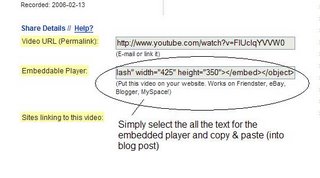
Try placing the video inside your blog using the copy and paste code for the for "Embeddable Player.” Note: you'll need to use Blogger's Edit HTML tab when pasting this code.
Other popular video hosting sites include:

No comments:
Post a Comment